621 B
621 B
 Subdivide Face
The Subdivide Face action splits each selected face. To do this, it adds a vertex at the center of each edge and connects them in the center.
Tip: You can also use this action with the Alt/Opt+S shortcut, or from the ProBuilder menu (Tools > ProBuilder > Geometry > Smart Subdivide).
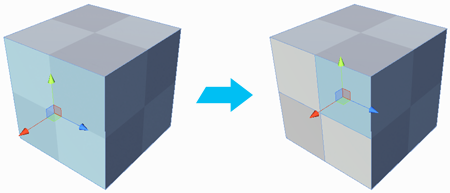
This allows you to add a lot more detail to your geometry. Alternatively, you can use the Cut tool to control the exact shape of the new faces.