 8400000b3b
|
||
|---|---|---|
| .. | ||
| .github | ||
| bindings | ||
| examples | ||
| queries | ||
| src | ||
| test/corpus | ||
| .editorconfig | ||
| .gitattributes | ||
| .gitignore | ||
| Cargo.lock | ||
| Cargo.toml | ||
| Icon128.png | ||
| LICENSE | ||
| Makefile | ||
| README.md | ||
| binding.gyp | ||
| grammar-reference.js | ||
| grammar.js | ||
| package-lock.json | ||
| package.json | ||
| playground-screenshot.png | ||
README.md
Kotlin Grammar for Tree-Sitter





Kotlin language grammar for Tree-Sitter. You can try it out directly on the web.

The grammar is based on the official language grammar.
Project Structure
| File | Description |
|---|---|
| grammar.js | The Tree-Sitter grammar |
| grammar-reference.js | A direct translation of the Kotlin language grammar that is, however, ambiguous to Tree-Sitter |
| src | The generated parser |
Setup
npm install
Development
Compilation
To (re-)compile the grammar, run:
npm run generate
Note that the grammar is written completely in JavaScript (grammar.js), the other source files are generated by tree-sitter.
Testing
To run the unit tests, run:
npm run test
WebAssembly
Compilation
First make sure to have Emscripten installed. If you use Homebrew, you can brew install emscripten. Then run:
npm run build-wasm
Playground
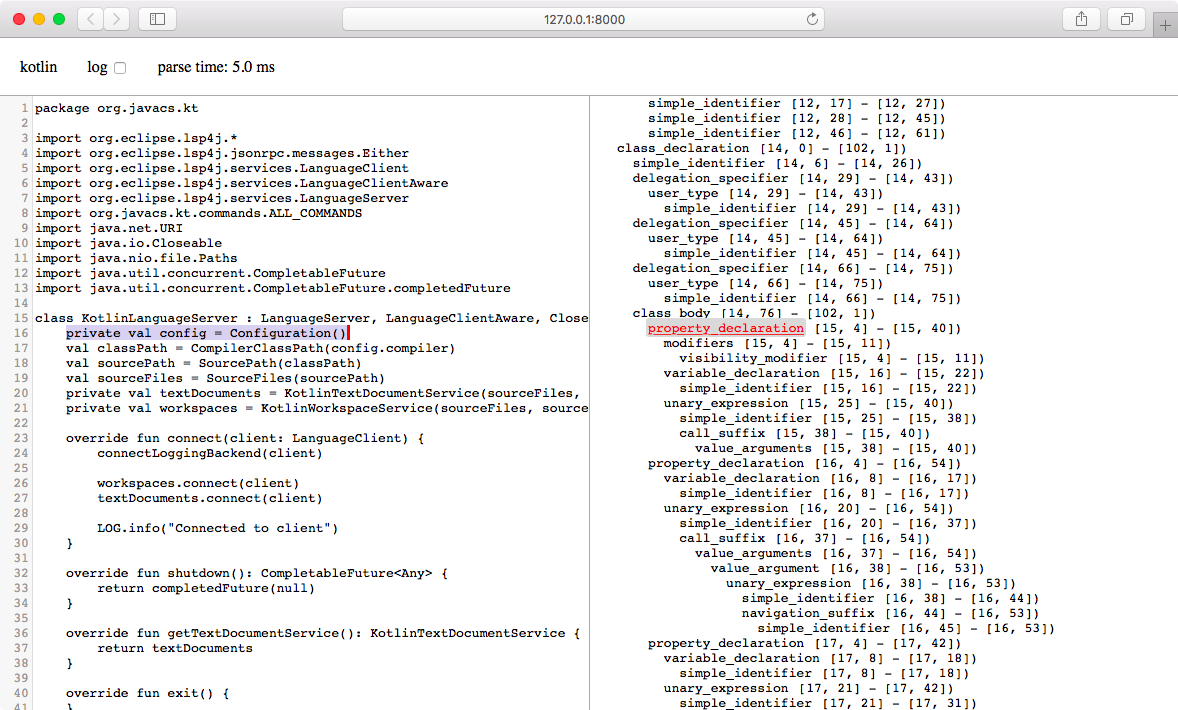
After compiling the grammar to WebAssembly, you can invoke
npm run playground
to launch an interactive editing environment that displays the parsed syntax tree on-the-fly in the browser. You can also view a deployed version of this playground on the web.
Documentation
More documentation on how to create Tree-Sitter grammars can be found here.
See also
- Kotlin Language Server for code completion, diagnostics and more
- Kotlin Debug Adapter for JVM debugging support