 1248682f68
|
||
|---|---|---|
| .github/workflows | ||
| config | ||
| img | ||
| sample_files | ||
| src | ||
| .gitignore | ||
| CHANGELOG.md | ||
| Cargo.lock | ||
| Cargo.toml | ||
| LICENSE | ||
| README.md | ||
| text_diff_notes.md | ||
README.md
It's Difftastic!
Difftastic is an experimental structured diff tool that compares files based on their syntax.
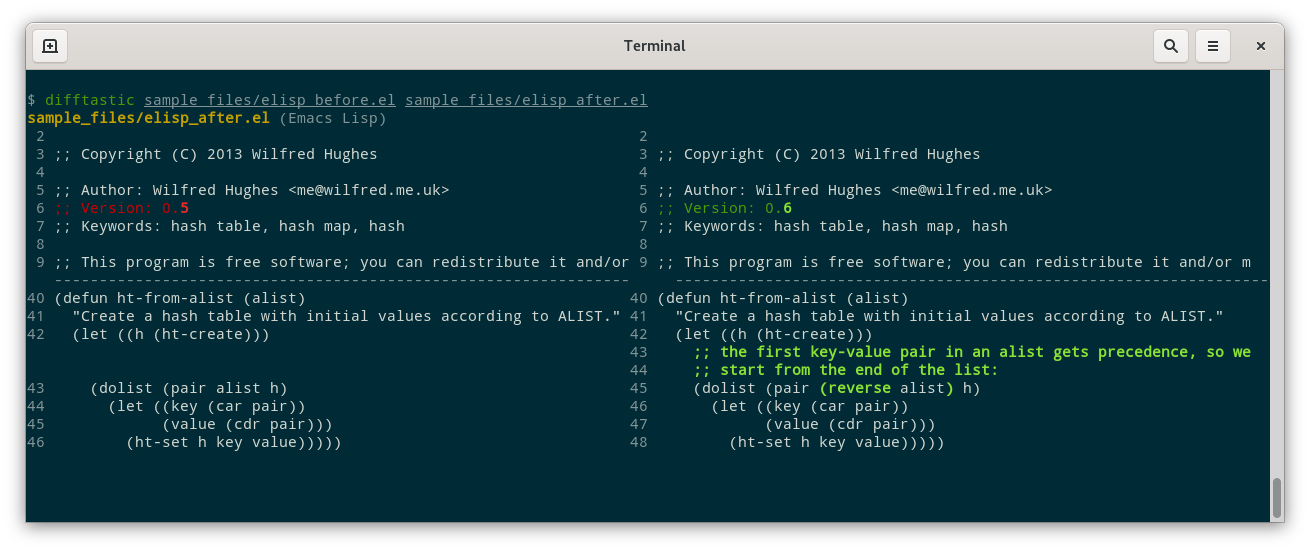
It is very much unfinished. It works reasonably on very parenthesised data (lisps, JSON), it works sometimes on other languages with sufficient parentheses (Rust, JS), and falls back to a line-oriented diff otherwise.
How It Works
(1) Parsing.
Difftastic treats source code as a sequence of atoms or (possibly nested) lists.
Language syntax is defined in config/syntax.toml: you provide
regular expressions for atoms (including comments), open delimiters,
and close delimiters.
This is heavily inspired by Comby, which handles a large number of languages by using a similar approach.
(2) Diffing.
Difftastic treats diff calculations as a graph search problem. It finds the minimal diff using Dijkstra's algorithm.
This is based on the excellent Autochrome project.
(3) Printing.
Difftastic prints a side-by-side diff that fits the current terminal. It will try to align unchanged nodes (see screenshot above).
Known Problems
Crashes. The code is underdocumented, undertested, and unfinished.
Performance. Difftastic scales relatively poorly on files with a large number of changes, and can use a lot of memory. This might be solved by A* search.
Comments. Small changes can show big diffs.
Non-goals
Patch files. If you want to create a patch that you can later apply,
use diff. Difftastic ignores whitespace, so its output is
lossy. (AST patching is also a hard problem.)
Installation
You can install the latest tag of difftastic with Cargo:
$ cargo install difftastic
Difftastic is still under heavy development, so there's usually major bugfixes since the latest release. I currently recommend you check out the repository and compile directly:
$ cargo build --release
This will give you a binary at ./target/release/difftastic that you
can put in a directory on your $PATH.
Dogfooding
Once you've compiled difftastic and it's on $PATH, you can try
dogfooding.
To see the changes to the current git repo in difftastic, you can add
the following to your .gitconfig and run git difftool.
[diff]
        tool = difftastic

[difftool]
        prompt = false

[difftool "difftastic"]
        cmd = difftastic "$LOCAL" "$REMOTE"
Alternatively, to run difftastic as the default diff engine for a git command:
$ CLICOLOR_FORCE=1 GIT_EXTERNAL_DIFF=difftastic git diff
$ CLICOLOR_FORCE=1 GIT_EXTERNAL_DIFF=difftastic git log -p --ext-diff
License
Difftastic is open source under the MIT license, see LICENSE for more details.
Files in sample_files/ are also under the MIT license unless stated
otherwise in their header.
Further Reading
The wiki includes a thorough overview of alternative diffing techniques and tools.